Field data capture built for the cab.
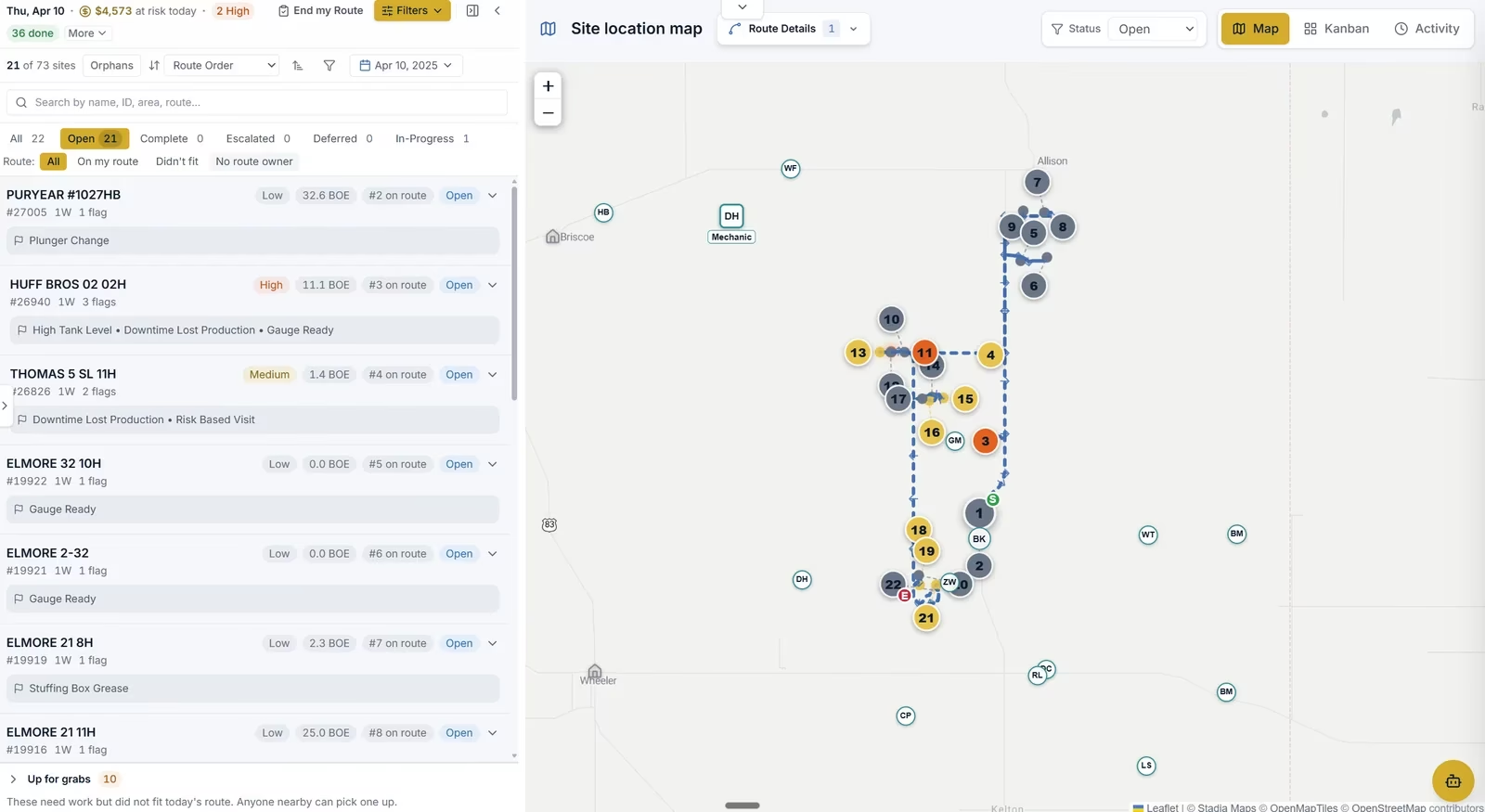
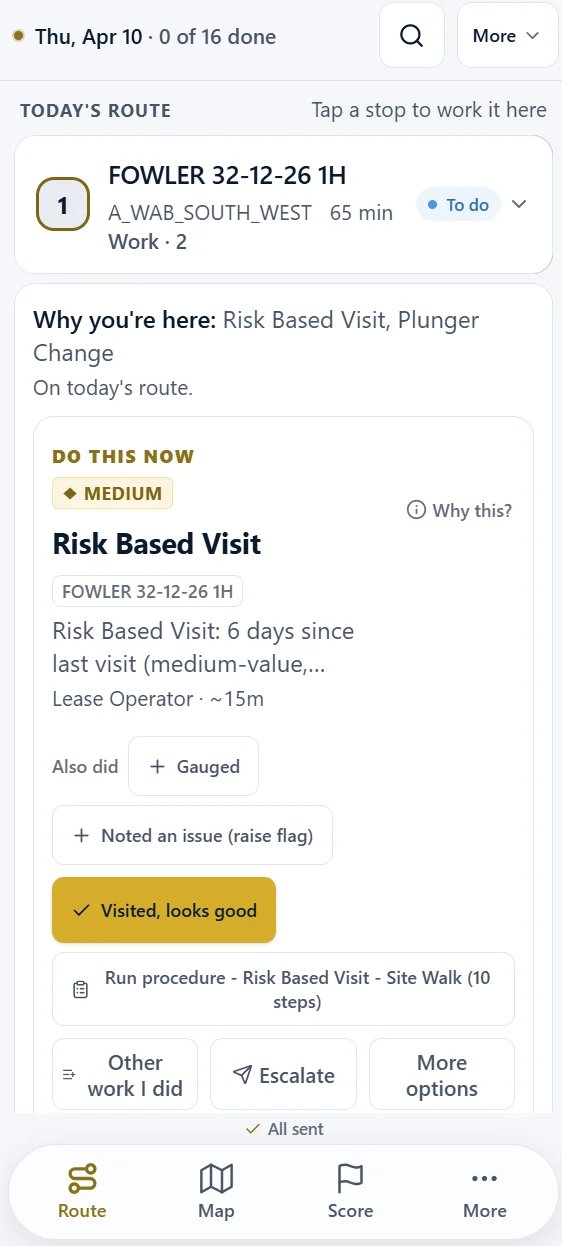
- 1Why this site is on today’s planThe reason the visit earned its place, and what is left to do there.
- 2What the well is doing, and what it is worthRates against the well’s own history, priced per day.
- 3The work the site is owedRecorded against the site while the operator is still standing at it.
Part of WellOPS
It records the reading once, at the wellhead, and lands it in your systems of record without anyone re-keying it.
You buy WellOPS by WorkSync. Field Data Capture is the field data capability of WellOPS, the operating platform for production operations, and it ships with the platform.
In plain terms
What is field data capture in oil and gas?
Field data capture in oil and gas is the collection of wellsite production and operating data by a lease operator or technician on a mobile device, in place of paper gauge sheets and a spreadsheet at the end of the day.
What is field data capture software?
It works by caching each site on the route, its forms and its prior readings onto the device while it still has service, recording tank gauges, well tests, runtime, downtime and inspection entries at the location with a time and location stamp, then syncing the queued records to production accounting, the historian and the maintenance system when a connection returns.
The captured record becomes the field system of record for volumes, so it has to reconcile against SCADA and support statutory production reporting: in Texas, operators file Form PR monthly for all crude oil, casinghead gas, gas well gas and condensate produced.
Source
- Railroad Commission of Texas, Form PR Instructions, Monthly Production Report (Statewide Rules 27, 54 and 58(b))
Field data capture software digitizes the readings, observations, and paperwork that oil and gas field crews record at the wellsite: tank gauges, meter reads, well tests, equipment checks, downtime notes, inspections, JSAs, and the pumper's daily log. Instead of a grease book, a clipboard form, and an end-of-shift Excel session in the truck, the pumper records each reading once, on a phone or tablet, and the data lands in the systems of record automatically.
Oil and gas field data capture is a harder problem than generic form apps admit. Most wellsites have no cell coverage. Crews work in gloves, in wind, next to running equipment. A tank gauge only matters if it reconciles against SCADA and lands in production accounting before month-end close. So field data capture systems for the oilfield are judged on four things: offline reliability, speed of capture, validation at the moment of capture, and how deep the integration into the back office actually goes.
Field Data Capture is the WellOPS module built to that standard. It is the mobile layer for every field task, and the front door of the same pipeline that feeds the ranked daily work plan and digital field tickets.
What an oil and gas field data capture system has to handle
Oilfield daily log software
Gauge sheets, production readings, runtime, and downtime notes, captured per well and per shift. Oilfield daily log software replaces the grease book only if it is faster than the grease book: one-tap entries, voice notes, and defaults from yesterday’s reading. The log, line by line, is on the oilfield daily log page.
Inspections and HSE forms
JSAs, hazard observations, facility inspections, and regulatory checklists, with photo evidence and signature capture where sign-off is required. The same app the pumper already has open, not a second one.
Well tests and tank gauges
Structured readings that reconcile against SCADA automatically. When the manual gauge and the sensor disagree, the discrepancy surfaces the same day as a work item, not at month-end as a mystery.
Field tickets
Vendor and company-labor tickets captured against the job they belong to, so cost lands on the right well. The full ticket-to-invoice story lives on the digital field tickets page.
The mechanism
How mobile data capture works in the oilfield
- 01 · Before the yard
Load the route before coverage runs out
- 02 · At the wellsite
Capture at the wellsite, offline
- 03 · On the device
Validate at the moment of entry, not at month-end
- 04 · Back in range
Sync and reconcile on the way back in
Mobile data capture in the oilfield works in four moves:
the day's sites and forms are cached on the phone or tablet while it still has service, the field team member records readings and observations on the device at the wellsite with no connection, every entry is validated on the device at the moment it is recorded, and the device syncs to the systems of record once it is back in range.
The offline step is what separates oilfield capture from a generic mobile forms app, because most wellsites have no cellular service, so the app has to carry a working copy of the route rather than a connection to a server.
- Load the route before coverage runs out. The day’s sites, the forms they call for, and each well’s prior readings are cached on the device while it still has service, so the rest of the route does not depend on a live connection.
- Capture at the wellsite, offline. Tank gauges, well tests, runtime and downtime notes, inspections and JSAs are recorded on the device at the location: one-tap entries, voice-to-text for notes, photos for what a number cannot carry, signature capture where sign-off is required, and a GPS and time stamp on every entry.
- Validate at the moment of entry, not at month-end. Range checks against that well’s own history, required fields that cannot be skipped, and unit guards all run on the device, offline. A suspect reading gets questioned while the person who took it is still standing at the tank.
- Sync and reconcile on the way back in. When the device returns to coverage, entries sync through DataHub into the production accounting system of record, and gauges reconcile against SCADA where sensors exist. Discrepancies surface the same shift as work items instead of at close as an allocation argument.
How the device carries the day with no signal, what it caches, queues and syncs, is on the offline field data capture page.
What the sequence produces is a plan the crew opens the next morning. That part does not summarize. View a Sample 6 AM Plan
Validation at capture, not at month-end
Why capture quality decides everything downstream
- Range check against the well’s own historyOn the device, offline
- Required fields that cannot be skippedOn the device, offline
- Unit guardsOn the device, offline
- Reconciliation against SCADA where sensors existSame shift, on sync
The failure mode of paper and spreadsheet capture is not that data goes missing. It is that bad data goes unquestioned for weeks. A transposed tank level or a gauge read against the wrong well flows into production accounting, gets trusted, and surfaces as an allocation fight at close.
Field Data Capture validates every entry at the moment it is recorded: range checks against that well's own history, required fields that cannot be skipped, unit guards, and a same-shift reconciliation against SCADA where sensors exist. The pumper fixes a suspect reading while still standing at the tank, which is the only cheap moment to fix it.
Clean capture is also what makes the rest of the platform work. The ranked plan in Work Engine is only as good as the field data underneath it, and DataHub can only reconcile systems that received the reading once, correctly, with a GPS and time stamp attached.
On the device, at the site, in gloves.
Where capture happens
The day arrives assembled: the morning brief, then the stops the readings belong to. Readings and forms are recorded against each site while the field team member is still standing at it. Synthetic demo data.
- 60%Less redundant tank gaugingdeployment figure
- 5,000+Wells in live deployments
- 0Re-keying at shift endby design
- OfflineCapture with no cell coverage
What it does
6 capabilities that turn your existing stack into action.
Offline-first mobile capture
One-tap completion, voice-to-text notes
Validation at the point of capture
Configurable forms without IT tickets
Syncs directly to the source systems
Captures context, not just numbers
What it replaces
Retires the workarounds your team has been stacking for years.
The workaround3 retired
Paper grease books and hand-logged tank gauges
RetiredRe-keyed at end of shift or never. Errors compound and erode trust in the data.
Single-purpose field capture apps
RetiredEach one captures one data type behind its own login and its own sync. Field Data Capture handles every field workflow in one app.
Excel forms emailed from the field to the office
RetiredAttachment chain breaks. Version control nightmare. No offline support.
Reads the systems you already run.
Works with your existing stack · Through DataHub
Production Accounting
- Enertia
- Quorum
- W Energy
- Oildex
SCADA / Reconciliation
- Ignition
- AVEVA PI
- Cygnet
Mobile Platforms
- iOS
- Android
- Tablet + phone
Form Outputs
- Excel
- CSV
- Direct API
The three parts of capture people search for
Go deeper
- MechanismOffline field data capture →What the device caches before the yard, what it records and checks with no signal, what it queues, and what happens when coverage returns.
- WorkflowOilfield daily log software →The pumper daily report, line by line: gauges, runtime and downtime per well per shift, entered once at the well and rolled up without retyping.
- WorkflowDigital field tickets →From the wellsite signature to the invoice: approval, cost coding and reconciliation, captured in the same app.
Pricing · WellOPS
Scoped to your operation.
GOOD
Field Data Capture standalone
BETTER
adds DataHub + Workflow Automation
BEST
adds Work Engine + Field Work Management
Impact Guarantee · license fees only when the metrics move
Scoped to your well count and systems with our implementation team when you plan your pilot. The pilot runs four weeks on one field, and DataHub is included.
Proof
The field does not need an eighth app. It needs one: the exception, the maintenance job, the capture, the cost, and the safety paperwork on one screen with one login, which is what ends the end-of-shift re-keying session in the truck. Captured once, synced once, one data pipeline.
Capability statement · no per-app count claimed
Before you ask
Common questions
What is field data capture software?
How does mobile data capture work in the oilfield?
What should an oilfield data capture app include?
What happens when pumpers are in cellular-dead zones?
Can it replace our oilfield daily log?
Can I customize forms without hiring a developer?
Does data actually land in Enertia / Quorum cleanly?
How is this different from single-purpose field data apps?
What does it cost?
See your own gauge sheet in the app.
Bring your gauge sheet, your well test form and one inspection checklist. We build them in the editor with you and put them on a crew device in the first week, validated against each well’s own history.